DIY & Home Projects / Guide
My Shed Plans Official Website: How to Reach the Real Order Page
My Shed Plans official website guide: the web address, what the real page shows, how checkout works at $37 and how to dodge lookalike pages and free downloads.
- Author
- Supplement Health Expert Editorial Team
- Updated
- Reading time
- 7 min
- Sources
- 0 cited
Key takeaways
- 01 The seller's site is myshedplans.com, and its order button leads to a ClickBank checkout.
- 02 The standard order is $37 in one payment, so a page showing a very different total is worth a second look.
- 03 Help comes through ticket forms on the seller's site, with published weekday hours of 8am to 6pm.
- 04 Free PDFs and bargain bundles on other sites are not the members-area library.
You want shed plans, and you want to land on the right page without wading through lookalikes. This guide covers the My Shed Plans official website: the web address, what the genuine page shows, how the order button works and a few easy habits that keep copies at bay. Use the button below and you arrive on the seller’s order path in a single click.
The My Shed Plans official website in plain words
The seller’s site is myshedplans.com. We print it as plain text on purpose, because typing an address yourself is a dependable way to confirm where a link really goes. The site is a long sales page that explains the library, shows the bonuses, describes the guarantee and carries the order button. Support, terms and privacy pages sit in the footer area.
The order button hands you over to a ClickBank checkout, since ClickBank is the retailer. So the payment screen belongs to the retailer rather than to the seller’s own page, which is simply how that platform works.
What the genuine page shows
Knowing the landmarks helps you recognize the right page. Going by the seller’s own text, expect to see:
- A headline about a large online library of shed plans and designs, with a members area behind it.
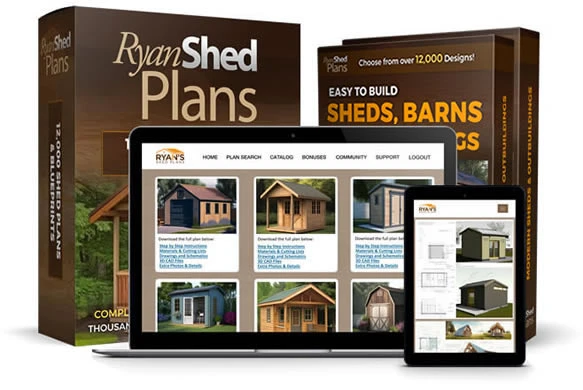
- Pictures of two boxes plus laptop and tablet mockups, the packaging art the seller uses.
- A description of what each plan holds: a lumber list, a cut list with tools named, written steps and 3D views.
- A list of four named bonuses, then the 60-day guarantee.
- Footer links for support, terms and privacy.
The address bar says My Shed Plans, while the page and the box carry the seller’s own brand for the product. It is the same library under a different label. Our My Shed Plans hub collects the facts if you want to compare them.
How checkout works
Click an order button and you land on the ClickBank pay page. Add your details and pay. On November 24, 2026 the standard order was listed at $37 in one payment. A disc edition for PC is also offered at checkout, and its price was not shown. Once the payment goes through, a confirmation email brings your order information.
Three quick checks that you are in the right place
- Look at the address in your browser bar. If you began on the seller’s page, it should read myshedplans.com.
- Find ClickBank on the payment screen. The seller names ClickBank as the retailer, so a checkout without it deserves a closer look.
- Compare the total. The standard order is $37, so a very different number for the same library is worth a pause.
Lookalikes, copies and free-download pages
Whenever a product catches on, pages with similar names appear. Some promise the plans free, some fold them into a cheap collection and some list files on auction or marketplace sites. None of these is the members-area library, and none carries the seller’s support or its guarantee. Files from unknown places may also hide malware, so the apparent bargain is rarely worth it.
If a page leaves you unsure, close the tab and return to the order path we linked. Our legit guide walks through the retailer, the support desk and the guarantee in more detail.
Support and contact on the seller’s site
The seller’s site provides ticket forms for two situations: questions before you buy, and help for people who already have an order. Published weekday hours run from 8am to 6pm, according to the seller. You will not find a phone number or an email address, so write a ticket and include your order details if you have paid. Keep the confirmation email close, since both support desks ask for what it contains.
Signing in after you order
Right after paying, you may want to search for a login page. The members area opens with the details in your confirmation email, so start from that message instead of a search result. Inside, you download plans as zip files of PDFs. The seller says the archives are large and slow to finish, and a free reader such as Adobe Acrobat Reader opens the PDFs. File the email somewhere safe; it is the quickest way to find your order details again.
A walk through the sales page
Reading the page before you click makes the order feel familiar. The seller opens with the idea of a big online library, then explains what a plan contains. Next comes a section on roofs, naming the styles covered, and then the seller’s “We Have It Or We’ll Get It” promise. If the plan you want is missing, a form collects the shed’s size and a rough outline, and per the seller a draft follows within two weeks. New plans are added monthly. The bonuses and the guarantee follow, and support links close the page. A page that skips most of these landmarks deserves a second look.
What a plan sheet gives you
Part of choosing the right page is knowing what you are paying for. A plan from the library is meant to be used with a pencil in your hand. The lumber list tells you what to buy, the cut list tells you what to saw and the written steps tell you the order of work. Print a sheet, tick items off as you go and keep it in the garage where the work happens. That practical, on-paper use is what the order is built around, and it is a clear reason to prefer the genuine members-area files over loose copies of unknown origin.
Small browser habits that help
A few quiet habits protect any online order. Type the seller’s address yourself rather than clicking a search ad. Look for the padlock symbol before entering card details. Bookmark the page once you are sure it is the right one, and keep a folder in your email for the confirmation message, because it unlocks both the members area and the refund route.
What the official order includes
For a quick recap, the order is a digital shed plan library with monthly additions and a custom request form, plus four bonuses. The standard price is a single payment of $37. Our price guide goes through the total line by line.
If the 60-day guarantee ever comes up
The seller’s 60-day money-back guarantee works through the support form: file a ticket, quote your order details and ask for the refund. ClickBank, the retailer, has order support at clkbank.com for payment matters. Starting with the confirmation email keeps things quick.
Sharing the right address
If a friend asks where to find the plans, send the address as plain text, myshedplans.com, rather than a shortened link of unknown origin. Typed addresses show exactly where you are going, and that habit removes most of the guesswork about copies. The catalog official website page repeats these steps in short form, and the product hub links everything together. Our review is a good companion read for anyone who wants the full picture before ordering.
Our recommendation
Go straight to the order path, confirm the retailer and the total, and treat anything that looks different with care. A real library, a ClickBank checkout and a written guarantee make a tidy package for the builder who wants choice and detail. When you are ready, open the order page and pick a design.
Frequently asked questions
What is the My Shed Plans official website?
The seller's site is myshedplans.com. Its order button opens a ClickBank checkout, and the support, terms and privacy pages sit on the same site.
Is there an app or a separate login page?
The library lives in a members area that opens after you order. Use the sign-in details in your confirmation email instead of a login page found through a search result.
How much is the order on the seller's page?
The standard order was listed at $37 in one payment when we read the page on November 24, 2026. A disc edition is offered at checkout, and the order screen shows any change to the total.
Can I buy it on Amazon or eBay?
Sales run through the seller's order page and ClickBank. A listing on a marketplace is not the members-area library, and it has no help desk or guarantee behind it.
How do I contact the seller?
Use the ticket forms on the seller's support pages. Weekday hours of 8am to 6pm are published, per the seller, and no phone line is listed.
What if I ordered from a different page?
Keep your confirmation email and write to ClickBank order support at clkbank.com with your order details. It can tell you which product and seller the payment went to.
my shed plans official website · my shed plans official site · myshedplans.com · my shed plans order page · where to buy my shed plans · my shed plans login · my shed plans fake site