DIY & Home Projects / Guide
Teds Woodworking Complaints: Common Questions, Clear Answers
TedsWoodworking complaints and concerns answered: skill level, tools, local building rules, file types, support and the 60-day refund route, with the $67 price.
- Author
- Supplement Health Expert Editorial Team
- Updated
- Reading time
- 7 min
- Sources
- 0 cited
Key takeaways
- 01 We found no verified buyer complaints to report, so this guide answers the questions worth settling before you order.
- 02 Skill level, tools, file types and local building rules are the practical points to check.
- 03 A 60-day money-back guarantee and a support ticket form give you a clear route if the library is a poor fit.
- 04 The price is $67 in one payment, with ClickBank as the retailer.
Anyone who searches for Teds Woodworking complaints is really asking what could go wrong before $67 leaves the account. Fair enough. We did not find verified buyer complaints to quote, and we will not invent any. What we can do is walk through the practical questions a careful woodworker asks, and show how the seller’s own terms answer each one.
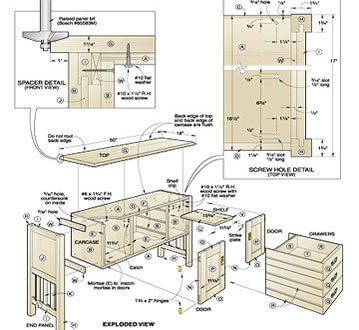
TedsWoodworking complaints: what we found and what we did not
Plenty of products attract worry because digital downloads are hard to picture. TedsWoodworking is a members-area library of plans, sold through ClickBank, with a support ticket form and a written refund promise. We have no verified buyer complaint to report, and quoting unverified ones would not help you. The questions below are the ones that matter in practice, and each has a clear answer.
“Will the plans be too hard for me?”
This is the most natural worry for a newcomer. According to the seller, the bulk of the library is aimed at beginners, with intermediate and some expert projects making up the remainder, and a difficulty filter sits in the search tools. Set it to beginner, open a few plans and see whether the drawings feel readable. Start with something small, like a simple shelf or a planter box, and move up when you feel ready. A beginner label is the seller’s, so go by your own comfort level with the saw.
“Do I need a full workshop?”
Not necessarily. The seller’s description of the typical kit is short: a table saw, a drill, some clamps and a sander. Each plan comes with a materials list, so you can see what a project needs before spending anything on lumber. If a plan calls for a tool you do not own, choose a different plan, because the library is large enough to offer alternatives. A modest home shop can cover a good share of it.
“What about local building rules?”
This one deserves a straight answer. The seller says its plans make no building-code claim. A birdhouse never raises the question, but a garden storage building, an elevated deck or a loft bed certainly does. Before work begins on anything like that, phone your local building department and ask about permits and requirements. Read every tool’s manual, put on eye and hearing protection and remember that a beginner label is not a safety guarantee. The plans supply drawings, and responsibility for local compliance stays with the builder.
“Which files do I get, and can I open them?”
Two formats are in play, PDF and DWG, per the seller. A free reader opens the PDF versions, which you can also print at home. DWG is the format used by design software, and the bonus DWG/CAD Plan Viewer is what opens it. If DWG sounds unfamiliar, begin with PDF plans and add the viewer later. Once you sign in, access works from whichever device you have handy.
“Is a bigger library actually better?”
The seller’s page puts the library at roughly 16,000 plans. That figure belongs to the seller, and we have not counted. A big number is not proof of quality (our product page keeps the facts together), so the sensible response is to browse before you commit to a project. The library is searchable by keyword and category, so you can see quickly whether the kinds of builds you want are there. You may end up using only a small part of the library, and that is fine: the value is in having choices when the next idea arrives.
“What if I only need one plan?”
Plans are not available one by one, per the seller. For a lone project, a free plan or a plan book may suit that one job better. If you expect to build several things, the single payment of $67 for the whole library is the simpler structure. Our comparison page sets the two approaches side by side.
“Is the price really one payment?”
The seller’s page showed us one package when we read it on November 24, 2026: $67, a single payment, tied in the seller’s terms to lifetime library access. The standard order is digital, with a physical DVD/USB edition listed as a separate checkout choice. Look at the total on the payment screen, and file the confirmation email that follows.
“What if I need help from the seller?”
The seller’s support page has a ticket form, and its footer lists a postal address in Austin, Texas. No phone number or printed email address appeared on the pages we reviewed. Members sign in through a members login on the seller’s main site. For payment issues, ClickBank, which sells the order, offers its own help desk at clkbank.com.
“What if it is not for me?”
The order carries a 60-day money-back guarantee. To act on it, visit the seller’s support page, enter the number printed in your confirmation email and request the refund. Replies come within 48 hours, the seller says. Since ClickBank processed the sale, you can raise a payment question there as well. Knowing the route before you pay makes the purchase calmer.
Questions that turn out to be small
Some worries shrink once you look at them. A fear of ongoing charges is answered by the single $67 payment on the order page. A fear of an unreadable file is answered by the free PDF reader. A fear of a confusing library is answered by the keyword search and the category list. And a fear of being stuck is answered by the guarantee and the support ticket form. Writing your own list of worries before you order, then checking each against the seller’s pages, takes about ten minutes and leaves you a much steadier buyer.
How to settle your own questions in ten minutes
Your concerns may differ from the ones above, and that is normal. A quick method works for any of them. Write the worry down in one sentence. Look for the matching fact on the seller’s pages, such as the skill filter, the tool list, the file formats, the guarantee or the support form. If the fact is there, tick it off. If it is missing, make a note and ask the seller through the ticket form before you order, or lean on the 60-day guarantee afterwards. Doing this once, with a pen and ten minutes, turns a vague worry into a short checklist you can answer.
Tips for a smooth first project
A good first experience removes most doubts. Choose a build that uses lumber you can buy in one trip, and read the cut list from top to bottom before making a single cut. Mark every board with a pencil label that matches the list. Work on a clear, well-lit surface, wear eye and hearing protection and keep the tool manual open next to you. Dry-fit the parts before glue or screws go in, and sand last. Small habits like these make even a beginner plan go smoothly, and finishing one project is the best answer to the question of whether the library suits you.
Our view
After going through the questions, the pattern is clear. The practical concerns, skill level, tools, file types and local rules, all have simple answers you can check before you build anything. The commercial concerns, price and refunds, are answered in writing. We give it 3.7 out of 5 on our own scale, as set out in our TedsWoodworking review. For the legitimacy checks, read the is it legit guide, and for every detail in one place visit the TedsWoodworking hub.
Frequently asked questions
Are there complaints about TedsWoodworking?
We cannot verify buyer complaints, so we do not quote any. This guide covers the practical questions worth asking before you order and how the seller's terms answer each.
What if the plans are too hard for me?
Per the seller, beginner projects dominate the library, and difficulty is a filter you can set, so a simple first build is easy to find before you move up.
What if I do not own the tools?
The seller describes a modest kit: a table saw, drill, clamps and sander. Read each plan's tool needs first and pick projects that suit your shop.
What if the plans do not meet my local rules?
The seller says the plans make no building-code claim, so the builder checks local requirements. A call to your building department comes first for any larger structure.
How do I reach support?
Through the ticket form on the seller's support page. The pages we reviewed printed no phone number and no email address.
How do I get a refund?
Submit a request on the seller's support page, quoting your order number, inside the 60-day guarantee window. The seller says it replies within 48 hours.
TedsWoodworking complaints · TedsWoodworking problems · TedsWoodworking concerns · TedsWoodworking questions · TedsWoodworking refund · TedsWoodworking support · TedsWoodworking customer service