Buying Guides / Guide
Where to Buy ColestZen: Order Steps on the Seller's Page
Where to buy ColestZen: order on the seller's page at trycolestzen.com, pick a package, check the total at BuyGoods checkout and keep your confirmation email.
- Author
- Supplement Health Expert Editorial Team
- Updated
- Reading time
- 7 min
- Sources
- 0 cited
Key takeaways
- 01 ColestZen is ordered on the seller's own order page at trycolestzen.com.
- 02 Checkout runs through BuyGoods, the order processor behind the seller's order buttons.
- 03 Check the package, the per-bottle figure and the shipping line on the summary before you confirm.
- 04 Keep your confirmation email and order number, because the return steps ask for them.
- 05 Six bottles at $49 each, with free US shipping and three bonus guides, is the lowest per-bottle option.
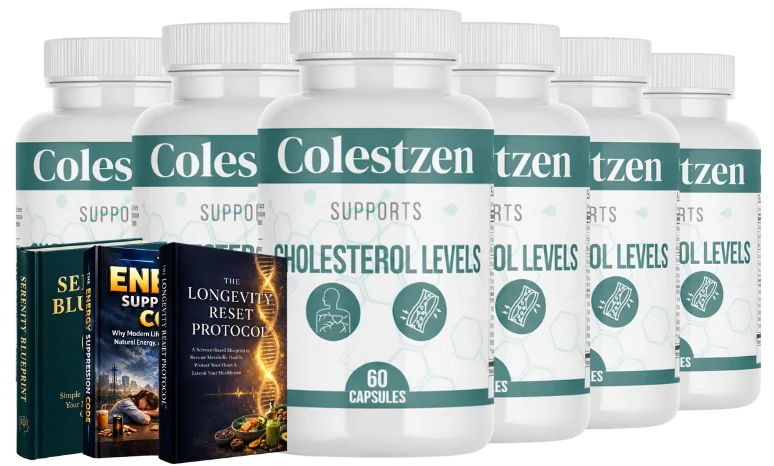
Where to buy ColestZen is a question with a short answer, and the steps that follow it are where most of the value sits. You order on the seller’s own page, at trycolestzen.com, and the order buttons in this guide take you there with our tracking code attached. Checkout is handled by BuyGoods, the order processor the seller uses. This walkthrough covers each stage from the first click to the confirmation email, so you know what every screen should show before you enter any details, and it points out the lines to check on the summary.
Where ColestZen Is Ordered
The ColestZen order is placed on the seller’s page, not on a separate marketplace listing. You do not need a retailer account to start. Use the buttons in this guide, which open the seller’s order page, then pick your package and move through checkout. The seller’s returns, support and guarantee details all attach to the order you place there, which is why the seller’s page is the place to order.
Step-by-Step Ordering
- Open an order button from this guide. That control opens the seller’s ordering screen directly.
- Pick your size: a pair at $79 apiece ($158), a trio at $69 each ($207), or the six-bottle set at $49 per bottle, $294 total.
- Read the shipping line. The six-bottle order ships without charge inside the US; smaller orders show shipping during checkout.
- Check the bonus guides. The digital guides ride only with the six-bottle order.
- Enter your details at checkout, then review the full summary.
- Save the confirmation message and the order number. You will need both if you return the order later.
What the Summary Should Show
Before you confirm, the summary should match the grid. The table below lists what each line should say, so a mismatch stands out.
| Summary line | What it should show |
|---|---|
| Package | The bottle count you picked |
| Price per bottle | $79 for two, $69 for three or $49 for six |
| Postage | Waived in the US on six; shown during checkout on two or three |
| Total | $158 or $207 before shipping, or $294 with free US shipping on six |
| Digital guides | Six-bottle package only |
If a line does not match this table, pause and write to [email protected] before you pay. The seller can update the page, so the figure on the summary is the one that counts for your order.
Checkout Through BuyGoods
Once you move past the package choice, the payment step runs through BuyGoods. Enter the email address you want to use for the whole order, since the confirmation message and the support contact both depend on it. Take a screenshot of the summary before the final button, so you have a record of the package and price you agreed to. The seller’s FAQ calls it a single charge with no auto-ship, and the summary is where you can confirm that.
The Bonus Guides, Where They Fit
Those guides are part of the six-bottle bundle and nothing else. According to the seller, they arrive as instant digital downloads: The Longevity Reset Protocol, The Energy Suppression Code and Serenity Blueprint. Their covers appear below, so you can recognise them when they show up in your inbox.

The Longevity Reset Protocol

The Energy Suppression Code
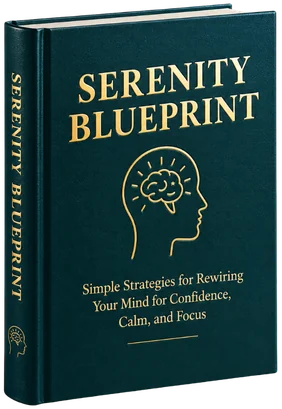
Serenity Blueprint
What the Seller’s Pages Show
The seller’s pages present the three packages with their totals, the 60-day money-back guarantee and a support address. The grid and the guarantee are the two parts to read before you move on to payment. The returns page then sets out the mail-back steps, and the contact page gives the support email. Reading those three places once, before you start, means the checkout screen holds no surprises for you.
Support, Returns and Contact Details
Support is reached at [email protected]. Expect a reply within a day during weekday business hours, 9:00 AM to 6:00 PM EST, per the seller. No phone number is listed, so email is the channel. For returns, the seller’s returns page gives a physical mailing address in Tallmadge, Ohio: JetPack, 285 Northeast Ave, Tallmadge, OH 44278. Return postage is your cost; the money comes back three to five business days after the seller receives the bottles.
Before You Start Checkout
Gather three things before you open the order page: the shipping address you want on the parcel, the email address you will check over the next few months, and a payment method you can use at checkout. Decide the package first. The two-bottle, three-bottle and six-bottle lines each carry different totals, and it is easier to compare them with a clear head than halfway through a form.
Ordering From a Phone
The steps are the same on a phone. Tap the order button from this guide, choose the package, then scroll the summary before you enter any personal details. If the summary is hard to read on a small screen, switch to a larger display for the final check. Save a screenshot of the summary once you are happy with it, so the package and price are on record before you press the final button.
When the Summary Does Not Match
If the bottle count, the per-bottle figure or the shipping line differs from this guide, pause and do not finish checkout. Write to [email protected] with the page details, a screenshot and the package you meant to order. The reply should confirm the total in writing before you pay. That one step protects you from a surprise on the final line, and it costs nothing but a short message.
Ordering for Someone Else
If you are buying for a partner or a relative, enter their shipping details exactly, and keep the confirmation email in your own inbox as well. The person who placed the order holds the order number and the return steps, so the email should reach whoever looks after the household’s supplements. A short note to the recipient explaining the routine, two capsules a day with a big glass of water, helps the bottle get used as intended.
Keeping Support in the Loop
Once the order is placed, keep the support address somewhere you will find it quickly. If the shipping line, the bonus guides or the return steps raise a question, write to [email protected] and quote the order number from the confirmation email. Put each question in its own short message, and keep the replies in one thread. That habit saves time later, because the whole history of the order sits in a single place.
Safety Before You Order
This is a dietary supplement, and the seller suggests that a physician review the bottle before the first capsule. That advice carries most weight if you take a statin, a diabetes medicine or a blood pressure medicine. Those prescriptions continue as directed, and no supplement is a reason to change them. Alpha lipoic acid, chromium, banaba, gymnema, cinnamon and bitter melon can bring blood sugar down, so anyone on a diabetes drug should talk to a doctor first. Licorice might raise blood pressure, and it can interact with certain prescriptions. Pregnant or nursing? Ask first. If chest pain, breathlessness or another sudden symptom appears, seek urgent help right away.
A Final Pause Before You Pay
Before the last click, run a short mental checklist. Is the package the one you meant to choose? Does the per-bottle figure match this guide? Is the shipping line what you expected for that size? Is the email address correct, since the confirmation depends on it? Do you have the support address saved? If every answer is yes, confirm the order with confidence. If one answer is no, return to the summary, correct the detail and check again.
After the Order
Store the confirmation note and order number somewhere easy to find. If a question comes up about shipping, the bonus guides or the return steps, write to support with that number. Read the guarantee terms once more before you start the routine. If you open a second order later, follow the same routine: the button from this guide, the summary check and the confirmation email.
Before You Click
Set aside five minutes and have your email address ready. Pick the package first. The six-bottle line is the one with free US shipping and the bonus guides, while the two- and three-bottle lines add shipping at checkout. Open the order button from this guide rather than typing an address from memory, because the button carries the tracking code the seller’s order page expects. If you want the full product details first, the ColestZen buyer guide has them in one place.
Making the Checkout Smooth
Enter your shipping address exactly as it should appear on the mailing label, including any apartment or unit number. Read each line of the summary before you confirm, and make sure the shipping line matches what you expected for your package. If you are unsure about anything on the page, stop and write to support before you pay. A short pause costs nothing.
Reading Your Confirmation Email
The confirmation email is the paperwork you will rely on most. Check that the order number, the package and the bottle count match the summary you approved. Keep the email for the full 60-day period, because the return steps begin with it. If the shipping line or the bonus guides look different when the order arrives, the order number in that email is the first thing support will ask for.
For the cost side of the decision, the ColestZen price breakdown explains each total, and the legit check walks through the seller details you will see on the order page.
Frequently asked questions
Where can I buy ColestZen?
Order on the seller's page at trycolestzen.com. The order buttons in this guide open that page with our tracking attached, and checkout runs through BuyGoods.
Can I order ColestZen from somewhere other than the seller?
This guide covers the seller's own order page, which is the route this site links to. Stick to that page, so the guarantee, support email and return form all belong to one order.
How do I know I am on the right order page?
The order page shows the three packages, the 60-day money-back guarantee and the support email [email protected]. The bottle is labelled Colestzen, with the words 60 capsules.
Does the order include shipping?
Six bottles ship free within the US. Two and three bottles have shipping added at checkout, and the amount appears on the summary before you pay.
What do I do if I need to return it?
Write to [email protected] within the 60-day window, fill in the Return and Refund Form that came with your order, mail the bottles back and wait for the confirmation email. The buyer pays the return postage.
Are the bonus guides part of every order?
No. The three free digital guides come with the six-bottle package only, as the seller describes them. The two- and three-bottle packages do not include them.
where to buy colestzen · buy colestzen · colestzen order · colestzen checkout · buy colestzen online · colestzen order page · colestzen shipping · colestzen bonus guides