DIY & Home Projects/Safety
TedsWoodworking Safety: Building Codes, Tools and Files
TedsWoodworking safety guide: check local building codes before a shed, deck or bunk bed, follow tool manuals, wear eye and hearing protection, open DWG files.
- $67, one payment
- 60-day refund
- DIY & Home Projects
By Supplement Health Expert Editorial Team · · 7 min read
- Refund window
- A 60-day money-back guarantee: contact the seller through its support page with your order details (the seller says it refunds within 48 hours). Keep your confirmation email. ClickBank is the retailer, with order support at clkbank.com.
- Price
- $67 one payment
- Category
- DIY & Home Projects
- Our score
- 7.4/10 editorial
Key takeaways
- 01 The plans are not made to meet any building code, so check with your local building department before a shed, deck, bunk bed or other structure.
- 02 Follow each tool's manual and wear eye and hearing protection.
- 03 A beginner label is a difficulty rating, not a safety guarantee.
- 04 PDF plans need a free reader, DWG plans need the bonus viewer, and a 60-day money-back guarantee covers the order.
Woodworking is rewarding, and a good plan helps. A plan is also only a set of drawings. A safe result comes from the choices you make around it: the rules for your area, the tools you use and the care you bring to the shop. This page puts those points in one place before you order, so your first project starts on solid footing.
Plans are not building approvals
The seller’s support page says the plans are not made to meet any building code, and that you should check with your local building department before beginning a project. It adds that the builder is responsible for local safety codes. We pass that along plainly, since it matters most for bigger builds.
Think about the projects where it counts: a shed, a deck, a bunk bed, a loft, a gazebo, a playset or any structure that holds weight or stands outdoors. Rules differ from one town to the next, and they can cover size, distance from a property line, footings, railings and spacing. A short call or visit to the building department before you buy lumber is a smart habit, and any notes you take belong in the plan folder.
A simple pre-build checklist
- Read the plan from the first page to the last before you cut.
- Compare the materials list with what your local supplier carries.
- Ask whether the project counts as a structure where you live.
- Open your tool manuals to the pages the plan relies on.
- Set up a clean, well-lit workspace with room to move.
Tool safety comes first
The seller lists a drill, clamps, a sander and a table saw as the usual kit. Each of those tools has its own manual, and the manual has the final word on setup and use. Follow it every time, even when a plan makes a cut look simple.
Good habits are the same for any builder. Keep guards and fences in place when the tool calls for them. Keep your hands clear of the blade, and use a push stick when a cut brings your fingers close. Unplug a tool before you change a blade or bit. Clamp the work so it cannot slip. If something feels wrong, stop and rethink the cut instead of pushing through.
Eye and hearing protection
Wear eye protection and hearing protection whenever a saw, router, sander or drill is running. Flying chips and loud motors are part of any woodworking shop, and protection is cheap next to the cost of an injury. A dust mask is also a sensible addition during sanding and cutting.
A beginner label is not a safety promise
Most of the library is rated beginner by the seller, with intermediate plans and a few expert ones above that. A skill level tells you how demanding the project is. It does not tell you how safe a tool is in your hands. A beginner plan may still use a table saw, and a table saw needs care from the first cut. Start with small projects, learn each tool well and move up when you are ready.
Workspace, dust and finishes
A tidy shop is a safer shop, and it is also a faster one. Keep the floor clear of offcuts and cords, light the work area well and keep a fire extinguisher where you can reach it. Sanding and cutting make dust, so open a door or use a fan, and sweep up before the next job. If you use stains or sealers, read the label and work where the air moves.
After the build: a quick inspection
When the last screw is in, take five minutes to look the piece over. Check that joints are tight, fasteners are seated, corners are rounded and edges are sanded smooth. Press on shelves and seats to see whether anything shifts. If the piece will carry weight or be used by a child, ask a second person to look it over too. A calm check at the end catches the loose leg or the missing screw before it becomes a problem.
Projects for children
Some plans in the library, such as those in the seller’s kids and recreation category, are meant for children to use. A bunk bed, a play structure or a climbing frame supports weight, so the building-code point applies in full. Check local rules, use sound lumber and hardware, and inspect the finished piece before a child uses it.
Choosing lumber and hardware
A plan lists what to buy, but you still need to choose sound pieces. Sort through the lumber yard stack and set aside boards that are cracked, badly warped or full of loose knots. Use hardware rated for the job, and match screw length to the thickness of the wood. Ask the yard staff if you are unsure, since they answer such questions all day.
Working with the plan files
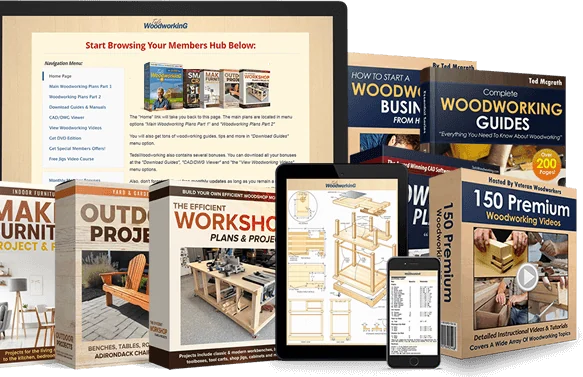
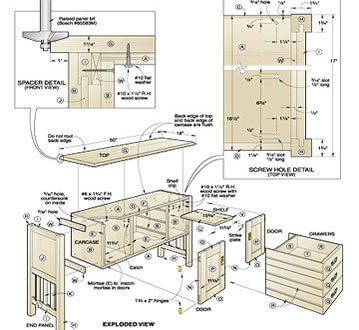
The files are PDF and DWG, per the seller. A PDF opens with a free reader, and the seller names Adobe Reader as an example. A DWG file opens with the bonus DWG/CAD Plan Viewer that comes with the order. Download files from your members area, and keep your login private. If a file will not open, check that you have the right program for its type, then contact the seller through its support page.
Terms, support and refunds
The seller publishes terms and a privacy page, and its support page works through a ticket form. No email address is printed on the pages we reviewed, so that form is the route for questions. Payment questions go to clkbank.com, because ClickBank is the retailer.
A refund route exists under the 60-day money-back guarantee: open a ticket on the seller’s support page, paste in the details from your confirmation email and keep that email until the matter is closed. Per the seller, refunds are processed within 48 hours. The where to buy page lists the order steps, and the price page shows the package.
TedsWoodworking Official Pricing
As listed on the official store · confirm at checkout
TedsWoodworking plan library
$67
One payment · digital delivery
- Members-area access to the plan library, instant after checkout
- Plans in PDF and DWG with cut lists and materials lists, the seller says
- Three digital bonuses: a DWG/CAD plan viewer, 150 videos and woodworking guides
- $67 in one payment, for lifetime access under the seller's terms
- 60-day money-back guarantee
One payment at checkout, with download or stream access after checkout. The checkout shows local currency and any tax, so the final amount can differ. Refunds: A 60-day money-back guarantee: contact the seller through its support page with your order details (the seller says it refunds within 48 hours). Keep your confirmation email. ClickBank is the retailer, with order support at clkbank.com..
Frequently asked questions
Do the plans meet building codes?
No. The seller's support page says the plans are not made to meet any building code and that you should check with your local building department before you begin. The builder is responsible for local rules.
Do I need a permit for a shed or deck?
That depends on where you live and the size of the structure. Ask your local building department before you start, and keep any approvals with your plan.
What safety gear should I wear?
Follow each tool's manual and wear eye and hearing protection whenever a saw, router or sander is running.
Is a beginner plan safe for a first-time builder?
A beginner label tells you the difficulty. It is not a safety guarantee, so read the plan and your tool manuals before the first cut.
How do I open the plan files safely?
PDF plans open with a free PDF reader. DWG plans open with the bonus viewer that comes with the order. Download files only from your members area.
teds woodworking safety · teds woodworking building code · teds woodworking permits · teds woodworking terms · woodworking plans safety · teds woodworking refund