DIY & Home Projects / Guide
My Shed Plans PDF: Zip Files, a Free Reader and Printing
My Shed Plans PDF explained: the plans come as PDFs inside large zip files that a free reader opens. See how to search, print and build from them for $37.
- Author
- Supplement Health Expert Editorial Team
- Updated
- Reading time
- 7 min
- Sources
- 0 cited
Key takeaways
- 01 The My Shed Plans library arrives as PDF plans packed in zip files, which you download from the members area.
- 02 A free Adobe Acrobat Reader opens the files, and one PDF can hold several blueprints, so the reader's search box saves time.
- 03 The zip files are large and can take a while to download, according to the seller.
- 04 A free copy found on a file-sharing page is not the genuine library, and the real order costs $37 in one payment.
A shed plan is only as handy as the file it arrives in. The My Shed Plans PDF format means you can search it, zoom in on a joint, print a page and carry it to the yard. This guide shows how the files arrive, what opens them and how to keep a big library tidy.
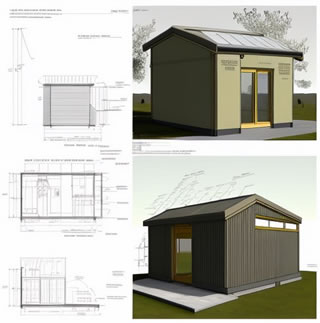
My Shed Plans PDF: what the files are
The seller says the library is delivered as zip files, and each zip holds PDFs. After checkout you sign in to the members area and download the archives you want. A zip is just a folder squeezed into one file, so your computer opens it with a double click and the PDFs sit inside.
One more detail from the seller’s support pages: a single PDF may carry more than one blueprint. That is why the PDF search function matters, and we come back to it below. The catalog what’s included page lists the full package.
What you need to open them
Only one thing is required: Adobe Acrobat Reader, which the seller says you need and which is free. Most computers already have a PDF viewer, but if yours is missing or old, install the free reader before you start downloading, so the files can be opened the moment they land.
- A computer is the easiest place to work, with a big screen for drawings.
- A tablet is comfortable in the garage and good for zooming.
- A phone works for a quick check of a dimension.
Plan for disk space, because the zip files are large, and keep the offer summary bookmarked for the checkout details. An external drive is a sensible home for them if your laptop is small.
Downloading without the wait
The seller warns that the zip files are big and can take a while. You cannot speed that up, but you can plan around it. Start the download before dinner, keep the laptop plugged in and leave the browser tab open. If your connection is slow in the evening, an early-morning start often finishes sooner.
Searching inside a PDF
A library with a lot of drawings needs a fast way to find the right one. Open a PDF and press Ctrl+F on Windows or Command+F on a Mac. Type a size such as 8x12, or a word such as gambrel, and the reader jumps to the matches. Because one file can hold several blueprints, search is quicker than scrolling.
Try a few terms for the same job: the roof name, the footprint, the word door or window. When you find a page you like, bookmark it in the reader so you can come back to it.
Printing a plan for the yard
A paper copy survives sawdust better than a screen does. Pick the pages you need, not the whole file, and print them at full size. Use the print preview to confirm the dimension lines are not cut off. A plain sheet protector keeps rain and dust off, and a clipboard stops the pages from flapping in the wind.
Some builders print the lumber list on its own and tick items off at the lumber yard. The cutting list is the one to keep nearby while you saw, because it tells you which board becomes which part.
Is there a free My Shed Plans PDF?
You will see pages that promise a free download of the whole library. Treat them with care. The genuine library is sold through the seller’s order page for $37 in one payment, and a copy offered elsewhere is not something we can vouch for. Files from unknown sources may be incomplete, old or unsafe for your computer, and they come with no support desk and no refund route.
The seller does show a free 8x12 sample plan on its own site, which is a fair way to see the layout before ordering. For a longer look at where to order, see our official website guide.
The optional DVD-ROM
Some people simply like a disc on the shelf. Checkout lists a PC DVD-ROM holding the core plans, and the seller puts delivery at 12 to 18 working days. The pages we read show no price, so we leave a figure out, and the order screen is where you will see its total. You need a computer with a DVD drive, since a home player cannot read it. The standard order stays fully digital, with nothing in the mail.
Keeping your library tidy
A big library gets messy fast, so give it a home on day one. Make one folder named after the product, and inside it a folder for each zip. Rename the PDFs you actually use with the shed size and roof style, such as 10x12 gable. Keep a short list in a notes file of the plans you liked and why. A backup copy of your favorites on a USB drive costs almost nothing, and it means a spilled coffee never costs you a plan.
Before you build from any PDF
A drawing is not a permit, and a shed is a structure, so the permit office comes before the saw. Ask about permits, the maximum size, how far the shed must sit from the fence line and which foundation your area expects. Have buried lines marked by calling 811 before footings go in. Put on safety glasses and ear protection, keep each tool manual within reach and bring a second pair of hands for heavy wall frames and roof sections. Nothing in these files promises that a finished shed satisfies your local code.
Reading a plan on screen
Not everyone prints. On a laptop, set the reader to show two pages side by side, so a drawing and its parts list sit next to each other. On a tablet, pinch to zoom into a corner joint and swipe back out to see the whole frame. Dark rooms are easier on the eyes with the reader’s night mode. A stand or a small clamp-on holder keeps a tablet at eye level while your hands stay free for the saw.
Three habits that save time
First, open the lumber list before anything else and total the boards for the size you picked. Second, write the sizes you will cut on masking tape and stick them on the boards, so the cutting list follows you into the shop. Third, glance at the next step before you finish the current one, because a PDF lets you scroll ahead in a way a video never does. None of these needs special software, only the free reader and a little patience.
If a file will not open
Most problems are small. Update the reader, pull the PDF out of the zip before opening it and make sure the download finished. Still stuck? Send a ticket to the seller’s help desk, name the file and quote what you ordered. Weekday hours run from 8am until 6pm, the seller says, and tickets stand in for a phone line. Keep your confirmation email, and remember that a 60-day money-back guarantee covers the order. Our complaints guide covers other practical questions.
The bottom line
The My Shed Plans PDF library is easy to live with once you know three things: install the free reader, start the large downloads early and search inside the files. For $37 in one payment, you get a catalog you can print, zoom and carry. To see what the library is and how it works, read what is My Shed Plans, or open the product page for the whole offer.
Frequently asked questions
What format are My Shed Plans files?
PDF. The seller delivers them in zip downloads from a members area, and a free Adobe Acrobat Reader opens them.
Why are the downloads so big?
The library holds a very large set of drawings. The seller warns that the zip files are large and can take a while, so start the download on a steady connection.
Can I print the plans?
Yes. A PDF prints like any document, so you can print the pages you need and carry them to the yard.
Is there a free My Shed Plans PDF?
The seller shows a free 8x12 sample plan on its own site. A full free copy elsewhere is not a source we can recommend.
Does the DVD play in a home DVD player?
No. The seller offers a PC DVD-ROM at checkout that ships in 12 to 18 working days, and it is meant for a computer.
What if a file will not open?
Install or update the free reader first. If it still fails, send the seller's help desk a ticket that names the file and the order you placed.
my shed plans pdf · my shed plans download · my shed plans zip files · my shed plans free pdf · my shed plans acrobat reader · my shed plans print · my shed plans dvd