DIY & Home Projects / Guide
Teds Woodworking Money Back Guarantee: 60 Days and How to Claim
TedsWoodworking money back guarantee explained: 60 days of cover on the $67 plan library, how to use the seller's support page and what to keep for a refund.
- Author
- Supplement Health Expert Editorial Team
- Updated
- Reading time
- 7 min
- Sources
- 0 cited
Key takeaways
- 01 The seller backs the $67 order with a 60-day money-back guarantee.
- 02 To ask for a refund, use the seller's support page and give your order details; the seller says it refunds within 48 hours.
- 03 Keep your confirmation email, because it holds the order information.
- 04 ClickBank is the retailer, and its order support at clkbank.com handles payment questions.
Buying plans online is easier when a refund promise sits behind the order. The Teds Woodworking money back guarantee gives you 60 days of cover on a single $67 payment, so you can open the members area, browse the plan library and order with more confidence.
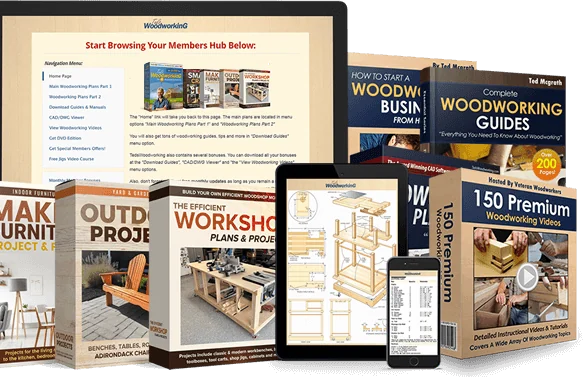
The TedsWoodworking money back guarantee, explained
The promise is easy to summarize: sixty days of money-back cover on the order. The seller’s sales page talks about a full refund and a quick answer, within 48 hours. The help pages confirm that a guarantee exists, and the wording is plain enough to take at face value.
For you, that means the $67 is not a one-way door. If the library does not suit your projects, your skill level or your taste, there is a route back to your money, and it begins on the seller’s support page. Our TedsWoodworking product page lists the whole offer, with the guarantee beside the price.
What the guarantee covers
The guarantee attaches to the order, which means the plan library and the three digital bonuses travel together: the DWG/CAD Plan Viewer, the video lessons and the woodworking guides. The standard package is digital, and a physical DVD/USB copy is an optional checkout extra, so mention it in your note if you added one.
We keep to what the seller states and avoid adding conditions of our own. If a detail matters to you, the seller’s support page is the place to confirm it before or after you order.
Your refund request in five steps
- Find your confirmation email. It holds the order information.
- Open the seller’s support page. The seller’s site uses a ticket form there.
- Write a short, polite message. Give your name, the email used for the order and the order number, and say you would like a refund under the 60-day guarantee.
- Send it and watch your inbox. A reply and refund are promised inside 48 hours, per the seller.
- Check your payment method. Banks take their own time to show a returned payment.
What to keep for your records
A small folder makes any refund smooth. Save the confirmation email, the date of the order and a screenshot of the order page if you like. If you send a message to support, keep a copy of that too. These few items give the seller everything it needs to find your order quickly, which helps a refund move along. Because ClickBank is the retailer, its receipt and order number are part of the same record.
Where ClickBank fits in
ClickBank handles the payment, and its order support at clkbank.com is the retailer’s own channel for billing matters. That is useful to know if a charge looks different from what you expected, or if the confirmation email does not arrive. For a refund under the seller’s guarantee, the seller’s support page is the route named on the seller’s pages.
Our legit guide shows how the seller, retailer and support page fit together, and the catalog price page lists the figures in a compact view.
Why a guarantee matters for a plan library
A library is something you only understand once you are inside it. Plan style, drawing detail and the way files are organized are hard to picture from a sales page alone. A guarantee closes that gap. You can search the catalog, open a few plans, read a cut list and see how the drawings look, knowing that a refund route exists if the fit is poor.
It also takes the pressure out of the order. A hobby purchase should be fun, and a clear promise helps it feel that way.
What helps you get value in the first weeks
The best way to find out whether a library suits you is to use it. Here is a simple routine. Install the bonus viewer so DWG plans open. Search by a category you care about and filter to your skill level. Open three plans, read each cut list and materials list, and choose one project. Print the pages and price the lumber. By the end of the first week you will know how the plans read and whether the catalog matches your tastes.
The seller’s own figure is about 16,000 plans, with fresh ones each month, so there is plenty to browse. For the full picture of how it works, read our guide on what TedsWoodworking is.
A short checklist before you order
Feeling ready to buy comes down to a few simple checks. Confirm that the order page shows one package at $67 and that ClickBank is named as the retailer. Look for the 60-day guarantee in the offer description. Make sure the email address you enter is one you can open today, because the login details arrive there. Choose the optional DVD/USB copy only if you want a physical edition, and note that its total shows at checkout. With those items settled, the order is a short, clean process.
Keeping the guarantee in perspective
A guarantee is a comfort, and the best outcome is still a project you are proud of. Use the weeks after you order to build something, even something small. A finished shelf or planter teaches you how the plans read, how accurate the cut lists feel in your shop and which tools you may want to add. If questions come up about how a plan works, the seller’s support page is also the place to ask, and the members area holds the video lessons and guides for extra help. A second look at a drawing, after a good night’s sleep, often clears up confusion before it costs any lumber.
Questions people ask about refunds
How fast is a refund? The seller promises a refund inside 48 hours, and your bank may need a few more days to show the money.
Do I need a reason? The seller’s pages ask you to get in touch and give your order details. A short, friendly note is plenty.
Who do I contact first? The seller’s support page, with your order details. For billing questions, ClickBank order support at clkbank.com is available too.
What if I lose the email? Search your inbox for the retailer’s name, and check your spam folder. The members login details came in the same message.
Safety still comes first
A refund promise covers the purchase, and it does not make a build safe. Nothing in the seller’s help pages claims code approval for the plans. A backyard storage shed, a porch deck or a child’s bunk bed should be cleared with your local building office first. Keep every machine’s manual handy, and wear goggles and ear protection whenever a motor runs. As for files, a free reader opens PDFs, and the bonus viewer handles DWG.
TedsWoodworking money back guarantee: the bottom line
One payment of $67 opens a large plan library, three digital bonuses and 60 days of refund cover. If the plans fit your projects, you have a catalog to build from for as long as you like. If they do not, the support page is the way back to your money. Either way, you begin with a clear route. The TedsWoodworking hub page gathers every detail, and you can review the price details in our price guide.
Frequently asked questions
Does TedsWoodworking have a money back guarantee?
It does. The order is covered for 60 days, and the seller's help section confirms the guarantee in its own words.
How do I ask for a refund?
Go to the seller's support page, send your order details and ask for the refund. According to the seller, the money comes back inside 48 hours.
What should I keep?
Your confirmation email. It carries the order information that support will ask for, along with your login details.
Who is the retailer?
ClickBank. If you have a question about the payment itself, ClickBank order support at clkbank.com is the retailer's own channel.
Does the guarantee cover the bonuses and the DVD/USB copy?
The bonuses are part of the same digital order. For the optional physical copy, mention it in your message so the seller knows what you bought.
Can I explore the members area first?
Access begins after checkout, and the guarantee sits behind the order. Browse the library, open a plan or two and use the support page if it is not for you.
TedsWoodworking money back guarantee · TedsWoodworking refund · TedsWoodworking guarantee · how to get a TedsWoodworking refund · TedsWoodworking 60 day guarantee · TedsWoodworking cancel · TedsWoodworking support