DIY & Home Projects / Guide
What Is Teds Woodworking? How the Plan Library Works Step by Step
What is TedsWoodworking? A members-area library of woodworking plans for $67 in one payment, with skill-level search, PDF and DWG files and a 60-day guarantee.
- Author
- Supplement Health Expert Editorial Team
- Updated
- Reading time
- 7 min
- Sources
- 0 cited
Key takeaways
- 01 TedsWoodworking is an online library of downloadable woodworking plans, opened through a members login.
- 02 The catalog runs to about 16,000 plans, according to the seller, searchable by category and sortable by skill level.
- 03 Each plan comes with a cut list, a materials list and drawings, per the seller, as PDF and DWG files.
- 04 The seller lists $67 as one payment, and a 60-day money-back guarantee applies.
Anyone who wants a weekend project without sketching it from scratch will ask the same thing: what is Teds Woodworking, and what do I actually get? In short, it is an online library of woodworking plans that you open after a single payment of $67, and this guide follows it from the first login to the first cut.
What is TedsWoodworking, in plain words
Think of a very large catalog where every page is a build. According to the seller, the library holds about 16,000 plans, from small items such as planters and shelves to bigger furniture and outdoor projects. Every entry is a downloadable plan, and the whole catalog sits behind a members login on the seller’s site, tedswoodworking.com.
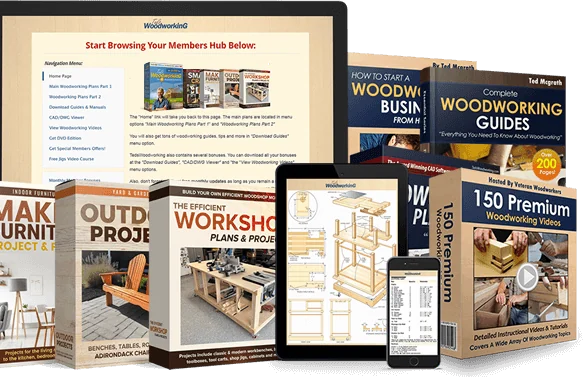
The TedsWoodworking hub page pulls the details together. The idea is simple and appealing: you pick the project, and the plan supplies the measurements. The seller describes step-by-step instructions, exact cut lists, full materials lists and multi-angle schematics that include exploded views. Our TedsWoodworking product page shows the offer at a glance, and every number the seller gives stays labeled as the seller’s.
How it works: the five steps
Here is the usual path, from the order button to the workbench.
- Order the library. The seller lists one package at $67, paid once, and its terms tie that payment to lifetime access. ClickBank is the retailer, and the seller says card and PayPal both work.
- Sign in. Your confirmation email carries the details for the members login.
- Search. Type a keyword, browse a category or filter by difficulty. The seller says categories number over a hundred, and plans can be sorted as beginner, intermediate or advanced.
- Open a plan. You see the instructions, the cut list, the materials list and the drawings, as PDF or DWG files.
- Print or view. Print the pages for the shop, or keep them on a screen next to the saw.
What a single plan contains
Open one plan and you should find what a builder needs before a trip to the lumber yard. The cut list names every board and its length. The materials list covers lumber, hardware and fasteners. The drawings show how the parts meet, and the exploded views pull them apart so the order of assembly is easy to follow.
The seller shows a sample exploded-view drawing on its site, which is a good way to picture the layout before you order. A plan like this turns a vague idea into a shopping list, and that is a real help to a hobby builder. We would not promise a particular result, since your tools, lumber and patience matter too.
The tools the seller expects
The seller’s description of the typical workshop is modest: clamps, a drill, a sander and a table saw handle the bulk of its plans. That is a starting point, not a rule. Suppose a project calls for a router or a jointer and you own neither. Browse for a different plan instead, since the catalog is big enough to offer an alternative for almost any idea.
Whatever you build, give every tool’s manual a read first. Goggles and ear protection belong on whenever a machine is running.
Search and skill levels
Search is the feature that makes a big catalog usable. You can start from a word, such as bench or birdhouse, or work down from a category like furniture, storage, outdoor and garden, or kids and recreation. The seller also says you can sort by difficulty. A first-timer might filter to beginner plans and read three or four before choosing, while an experienced builder can head straight for the advanced ones.
Files, formats and devices
Plans arrive as PDF and DWG files. PDFs open in any free reader. DWG files are the drawing format used by CAD software, and the seller supplies a bonus viewer to open them. For most plans, says the seller, measurements are given in both inches and metric, which helps if you buy lumber outside the United States. Because you log in through a browser, the library is reachable from whichever device is closest.
For a closer look at file handling, see our guide to the TedsWoodworking PDF and how printing works.
Extras that come with the order
Three digital bonuses are listed with the order, and none adds to the total. There is a DWG/CAD plan viewer for opening drawings, a set of video lessons (over 150, says the seller), and a collection of woodworking guides that the seller says runs beyond 200 pages. The guides cover basics such as hand tools and joinery. Our bonuses guide describes each one in more detail.
The seller adds that new plans arrive every month, and the members area includes a form for requesting a plan that the seller will draft. Because those are seller statements, treat them as the seller’s description of the service.
A typical first week with the library
A realistic first week is gentle. On day one you sign in, install the viewer and wander through a few categories. On day two you filter to beginner plans and open three that appeal. By midweek you read one all the way through, compare its materials list with what is already in the garage and print the cut list. Then comes the part you came for: a first small build, such as a shelf or a planter, on the weekend.
That rhythm is why people pick a library over a single plan. Once the first project is done, the next idea is already waiting a few clicks away, and the second build usually goes faster because you now know how the plans are laid out.
Who it suits
TedsWoodworking suits people who like choosing from many projects: a parent after a toy chest, a homeowner who wants a garden bench, a hobbyist who finishes one build and wants the next idea ready. It is a good match for anyone who prefers to start from a finished drawing rather than from a blank sheet.
If you want exactly one project, a single plan from another source may be enough, and our comparison page sets the library next to free plans and single books. For wider shopping, the TedsWoodworking review gives our full verdict.
Before you build anything large
The seller’s help pages say the drawings are not designed to satisfy any building code. For a shed, a deck, a bunk bed or another structure, ask your local building office what applies before you buy lumber. A beginner label speaks to difficulty, not to safety, so read every step and keep protective gear on.
Refund cover in a few lines
Should the library turn out not to fit, the 60-day money-back guarantee covers the order. Send a message on the seller’s support page and quote your order information. The seller says refunds are made within 48 hours. Hold on to the confirmation email, because it carries that information. ClickBank is the retailer, so its order support (clkbank.com) handles payment questions.
What is TedsWoodworking worth to you?
The answer depends on how often you build. One payment of $67 gives a steady supply of ideas to anyone who builds a few times a year, and the size of the catalog means you rarely run out of options. If you build once in a blue moon, a free plan might serve you well. For everyone in between, the library is an easy way to keep a project list full.
Frequently asked questions
What is TedsWoodworking in one sentence?
It is a members-area library of woodworking plans that you open after one payment, with search tools, cut lists, drawings, video lessons and new plans each month, according to the seller.
Is TedsWoodworking a book or a website?
It is a website you log in to. Plans are files you open or print, and the checkout also lists a DVD/USB copy if you would rather hold something physical.
How many plans does it have?
The seller puts the catalog at about 16,000 plans. That figure comes from the seller, and we have not counted them ourselves.
Can a beginner use it?
The seller says most plans are aimed at beginners, with the rest at intermediate and some expert builders, and a skill filter helps you pick. Start small and read each plan before cutting.
Can I buy a single plan from it?
The seller's help pages say plans are not sold individually. The $67 order opens the whole library.
What if it is not what I expected?
The 60-day money-back guarantee covers the order. Message the seller on its support page with your order information, and keep the confirmation email handy.
what is TedsWoodworking · TedsWoodworking explained · how TedsWoodworking works · TedsWoodworking members area · TedsWoodworking plan library · what is Teds Woodworking · TedsWoodworking how it works