DIY & Home Projects / Guide
Teds Woodworking Bonuses: DWG Viewer, 150 Videos and Guides
TedsWoodworking bonuses explained: a DWG/CAD plan viewer, over 150 video lessons and woodworking guides come with the $67 plan library, per the seller's page.
- Author
- Supplement Health Expert Editorial Team
- Updated
- Reading time
- 7 min
- Sources
- 0 cited
Key takeaways
- 01 Three digital bonuses come with the TedsWoodworking order: a DWG/CAD Plan Viewer, over 150 video lessons and woodworking guides.
- 02 The viewer is the bonus that opens DWG plans, so it is the one to install first.
- 03 The guides run beyond 200 pages, according to the seller, and cover basics such as hand tools and joinery.
- 04 The bonuses add nothing to the $67 total, and a 60-day money-back guarantee covers the whole order.
A plan library is the main course, but the extras can make it feel complete. The Teds Woodworking bonuses add a viewer for drawings, a shelf of video lessons and a set of woodworking guides, and the seller includes all three with the one $67 payment.
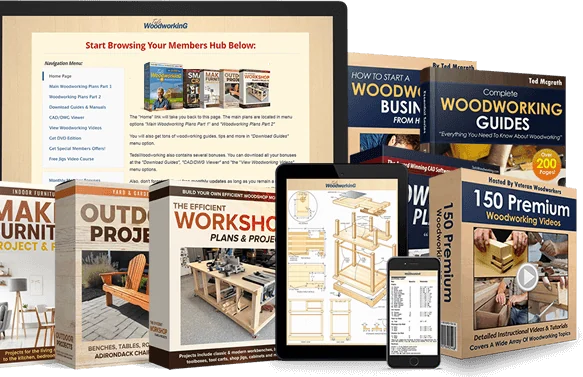
The TedsWoodworking bonuses at a glance
Here are the three extras as the seller presents them. We do not quote any values, because none is needed: they are simply part of the order.



| Bonus | What it does for you |
|---|---|
| DWG/CAD Plan Viewer | Opens DWG plan files, per the seller |
| 150 Premium Videos | Step-by-step lessons from experienced woodworkers |
| Complete Woodworking Guides | Over 200 pages on basics such as hand tools and joints |
Our TedsWoodworking product page gathers the whole package, and the catalog what’s included page explains the same items next to the plan library itself.
Bonus one: the DWG/CAD Plan Viewer
Start here, because this bonus unlocks part of the library. According to the seller, plans come as PDF and DWG files, and DWG is a drawing format that a normal document reader does not open. The viewer is the seller’s software for opening those drawings, and the seller says it can also edit or create plans.
What that means in practice: you can zoom into a joint, check a dimension and, if you like, change a length so a bookcase fits your wall. A builder who never touches a DWG file will still be fine with PDFs and a free reader. If you plan to explore both formats, install the viewer in your first hour and open one plan in each.
Bonus two: over 150 video lessons
Reading a plan is one thing, and watching a technique is another. The seller describes more than 150 premium woodworking videos with step-by-step instruction from veteran woodworkers. For a newcomer, that gives a way to see a cut, a joint or a finish before trying it on real lumber.
A smart routine is to match a video to your project. Choose a plan, check which skills it asks for, then watch the lesson that covers the trickiest one. Short clips on one skill at a time are easier to absorb than a long session, and you can replay a step as often as you like while the saw is switched off.
Bonus three: the complete woodworking guides
The third extra is a collection of guides, and the seller puts its length at more than 200 pages. The subjects the seller names, such as hand tools and dovetails, show that the content leans toward fundamentals. Those are the skills that every project borrows from, whether it is a picnic table or a jewelry box.
Treat the guides as a reference to dip into. Read the section on a joint before you cut it, or check a tool description when you are unsure about a setup. Because the guides are digital, they live in the members area alongside the plans, and you can search or print the pages you want.
How the bonuses work with the plan library
Each bonus plays a different role. The plans tell you what to build and how the parts fit. The viewer lets you open the drawing format. The videos show how a technique looks in motion, and the guides explain the reasons behind a method. Together they make a loop: pick a plan, learn the skill, read the background, cut the wood.
The seller also says the library gets new plans each month and offers a form for requesting a plan, so the bonuses sit alongside a catalog that keeps moving. For the details of how plans are organized, see our explainer on what TedsWoodworking is.
A simple first-week plan using the bonuses
If you like a clear path, try this. Day one: log in and install the viewer. Day two: watch a couple of videos on the basics. Day three: pick a beginner plan and read the matching section of the guides. Day four: print the cut list and the materials list. Weekend: build something small. That week gives every bonus a job and leaves you with a finished project instead of a long list of bookmarks.
What the bonuses do not include
The seller names these three extras for the order, and they do not cover lumber, hardware or tools. The video lessons are not a substitute for the manual of each machine, and the guides are not a safety course. Everything on this page describes only the plan library and its three digital extras.
Safety before you build
Pay attention to one point in the seller’s help pages: the plans come with no building-code approval. Before buying lumber for something like a garden shed, a raised deck or a child’s bunk bed, find out from your local building department which rules apply. Videos and guides teach technique, yet they never stand in for the manual of each tool, so read those first and keep eye and hearing protection on while a machine runs. A beginner tag helps with choosing a project and says nothing about safety. One last reminder on files: PDF needs a free reader, and the bonus viewer opens the DWG plans.
Setting up the viewer in five minutes
It helps to treat the viewer as a small setup job rather than a chore. After you log in, find the viewer in the members area and install it the way you would any program. Open one DWG plan to confirm it loads, then learn three moves: zoom, pan and measure. That is usually all you need to read a drawing comfortably. Save a shortcut to the program somewhere handy, because you will reach for it whenever a plan arrives as a drawing.
Making the videos earn their place
Watching video lessons works best with a purpose. Before pressing play, write down the one skill you want to learn, such as cutting a straight dado or fitting a drawer. Watch with a notepad, pause on the key step and replay it. A lesson watched with a project in mind sticks far better than one watched for fun, and it lets you walk into the shop with a clear picture of the first cut.
Using the guides as a reference shelf
The guides are written to be consulted rather than read in one sitting. Keep them open on a second screen while you build, or print a few pages and tape them near the bench. When a plan says to cut a joint you have not made before, a quick look at the matching guide section can save a spoiled board.
Who gets the most from the bonuses
Newer builders may gain the most, since the videos and guides cover the basics that plans assume. Experienced woodworkers may lean on the viewer and the plan catalog instead, and the TedsWoodworking hub shows how all the pieces fit. For a closer look at the file side, read our TedsWoodworking PDF guide, and for the full price breakdown see the price guide.
Refund cover for the whole order
One 60-day money-back guarantee covers the plans and all three extras together. If you ask for a refund, the seller’s support page is the route: describe your order and, as the seller tells it, a reply with the refund follows inside 48 hours. Your confirmation email proves the purchase, so save it. Billing questions can also go to ClickBank (clkbank.com), which is the retailer.
Frequently asked questions
What bonuses come with TedsWoodworking?
The seller lists a DWG/CAD Plan Viewer, a set of over 150 premium woodworking videos and a collection of complete woodworking guides.
Do the bonuses cost extra?
No. The seller presents them as part of the $67 order, so they add nothing to the total shown at checkout.
Do I need the plan viewer?
Only for DWG plans. PDF plans open in a free reader, while the bonus viewer is what opens the DWG files, according to the seller.
Are the videos for beginners?
The seller describes them as step-by-step lessons hosted by veteran woodworkers. A newcomer can watch a technique before trying it on a plan.
How long are the guides?
According to the seller, the guide collection is longer than 200 pages and covers subjects like hand tools and dovetails.
Is there a refund if the bonuses do not help?
The whole order is covered by a 60-day money-back guarantee. Send your request on the seller's support page, mention what you bought and keep the confirmation email as your record.
TedsWoodworking bonuses · TedsWoodworking bonus · TedsWoodworking videos · TedsWoodworking DWG viewer · TedsWoodworking guides · TedsWoodworking what you get · TedsWoodworking extras