DIY & Home Projects / Guide
Teds Woodworking PDF: Plan Files, Printing and the DWG Viewer
TedsWoodworking PDF explained: plans come as PDF and DWG files, PDFs open in a free reader, DWG needs the bonus viewer, and one $67 payment opens the library.
- Author
- Supplement Health Expert Editorial Team
- Updated
- Reading time
- 7 min
- Sources
- 0 cited
Key takeaways
- 01 TedsWoodworking plans are delivered as PDF and DWG files through a members login, according to the seller.
- 02 A free PDF reader opens the PDF plans; the bonus DWG/CAD Plan Viewer opens the DWG plans.
- 03 You can print a plan for the shop or keep it open on a phone, tablet or computer.
- 04 A file-sharing page offering a free TedsWoodworking PDF is not the seller's library; the order page is.
If you are searching for a Teds Woodworking PDF, you probably want to know how the plans reach you and whether you can print them for the shop. Here is the short answer: after one payment of $67, the library opens in your browser, and each plan can be downloaded as a PDF or DWG file, according to the seller.
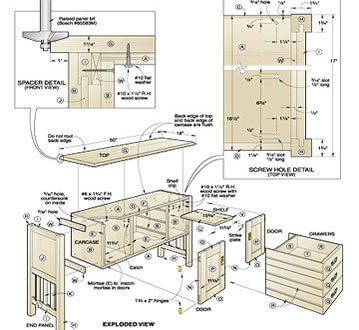
TedsWoodworking PDF and DWG: what the files are
Every plan in the library is a document you can save, print or open on a screen. Per the seller, plans are offered in two formats. PDF is the familiar one: it keeps the layout of a page the same on every device, so a cut list prints the way it looks on screen. DWG is a drawing format used by CAD programs, and it suits people who like to zoom into a design or adjust a dimension.
Our TedsWoodworking product page lists the whole package, while the what’s included page shows what sits inside each plan.
What you need to open them
The list is short. For PDF plans, a free reader is plenty, and most computers and phones already have one. For DWG plans, the seller includes a bonus: the DWG/CAD Plan Viewer, which it describes as software for opening, editing and creating plans. Install it once, and DWG files open without any further shopping.
Here is the quick picture:
| File | What opens it | Cost |
|---|---|---|
| PDF plan | Any free PDF reader | Free |
| DWG plan | The bonus plan viewer | Included with the order |
How to print a plan for the shop
Printing is where a digital library earns its place on the workbench. A practical routine looks like this:
- Open the plan from the members area and scan it first, front to back.
- Print the cut list and the materials list on plain paper. Those are the two pages you will handle most.
- Print the drawings at a size you can read. Large drawings may need printing in sections or at a print shop.
- Clip the pages to a board near the saw, away from dust and sawdust.
If you prefer a screen, a tablet on a stand works too, and the plan stays one tap away. The seller says the library can be reached from a phone, a tablet or a computer through your login.
Where the plans live
The files sit inside the members area on the seller’s site, tedswoodworking.com. That means your login is the way in, and the library is not a single PDF that arrives as one attachment. Think of it as a shelf of plans: you pick a project, open it and save the file you need. The seller says the shelf holds about 16,000 plans, with new ones added monthly, and you can sort by category and skill level to find a match.
Is there a free TedsWoodworking PDF?
Sometimes a search turns up a page that promises a free TedsWoodworking PDF. Be careful with those. The real library is opened through the seller’s members login after the order, so a file on a sharing site is not the seller’s library and may be incomplete, outdated or something else entirely. Downloads from unknown pages can also carry unwanted software, which is a bad swap for a $67 order with a refund promise behind it.
If you want a free taste, the better move is to read a free plan from any source and see whether the style suits you. For the full catalog, order through the link in this guide, which opens the seller’s own page. The TedsWoodworking hub has the full package, and our guide to what TedsWoodworking is explains how the whole library works if you want the background first.
Which format suits which builder
A builder who likes paper will lean on PDF. Print, mark with a pencil, check off each cut. Someone comfortable with CAD or design software may enjoy the DWG files, since a drawing can be zoomed, measured and changed on screen. You can use both: PDF for the workbench and DWG for planning a tweak, such as shortening a shelf to fit an alcove. Because the viewer comes with the order, nothing stops you from opening both formats for the same project.
The seller also says most plans give measurements in both imperial and metric, so the same file can serve a builder in inches or in millimeters.
The viewer, videos and guides
Besides the viewer, the order lists two more bonuses: a video library of more than 150 lessons and a stack of woodworking guides that the seller puts at over 200 pages. These are digital too, so they live in the same members area. Our bonuses guide goes through each one.
Before you build from any plan
Before you cut anything, a word on safety. The seller’s help pages make clear that no building-code approval comes with the plans, and printing one does not add any. Anything structural, such as a backyard shed, a raised deck or a child’s bunk bed, deserves a call to your city or county building office first. Read the manual for every saw and drill you use, and put on goggles and ear protection before the motor starts. On the file side it stays simple: a free reader for PDF, the included viewer for DWG.
Saving data and battery in the shop
A phone or tablet running a plan all afternoon will drain its battery, so keep a charger within reach or print the pages that matter most. Downloading the plan before you head to a garage with weak signal also helps, since you will not depend on a connection mid-cut. A quick screenshot of the cut list is a handy backup too.
Reading a plan on screen or on paper
Both ways work, and each has a small trick. On a screen, zoom in on a joint until the dimensions are easy to read, then zoom out to see how the pieces relate. On paper, use a pencil to tick off every cut as you go, and circle any step that needs a second look. A plan is only as useful as your habit of reading it twice before the first cut, since the cut list is the part of the file that saves lumber from mistakes.
Keeping your files tidy
A big library invites a messy downloads folder. A little structure helps: make a folder per project, save the plan and any notes in it, and name files by project and date. Back the folder up once in a while, since a lost file is annoying mid-build. If you print, keep a binder with one sleeve per project so the cut list is always where you left it. The members area remains your source if you ever need a fresh copy.
Your refund route
Refund cover lasts 60 days. Should you want it, open the seller’s support page and send your purchase information; the seller says money goes back inside 48 hours. Your confirmation email is the record of the order, so file it somewhere safe. For billing matters, ClickBank (clkbank.com) is the retailer to contact. Our price guide lists exactly what the $67 covers.
TedsWoodworking PDF: the bottom line
You get plans as PDF and DWG files, a free reader for one and a bonus viewer for the other, and the freedom to print or read on any device. For one payment of $67, that is a tidy way to keep a long list of projects at your fingertips.
Frequently asked questions
Do TedsWoodworking plans come as PDF files?
Yes. Per the seller, plans are delivered as PDF and DWG files. A free reader opens the PDFs, and the bonus plan viewer opens the DWG ones.
Do I need special software for the plans?
For PDF plans a free reader is enough. DWG plans are drawing files, and the seller includes a plan viewer with the order so you can open them.
Can I print a plan?
Yes, a plan is a file, so you can print the pages you need for the workbench. A larger drawing may need to be printed in sections or sent to a print shop.
Is there a free TedsWoodworking PDF I can download?
The plan library sits behind a members login after the $67 order. A free copy on a file-sharing page is not the seller's library, and it may not be what it claims.
Can I use the plans on my phone or tablet?
The seller says the library can be reached from a phone, a tablet or a computer through your login. Printing the cut list as well keeps a clean copy in the shop.
What if the files do not suit me?
The order carries a 60-day money-back guarantee. Use the seller's support page, give your purchase information and file the confirmation email.
TedsWoodworking pdf · TedsWoodworking pdf download · TedsWoodworking dwg · TedsWoodworking plans pdf · TedsWoodworking free pdf · TedsWoodworking file formats · print TedsWoodworking plans