Creator Software / Guide
What is InstaDoodle: A Plain Guide to the Doodle Video Tool
What is InstaDoodle? A cloud web app that turns a written scene into a doodle explainer video, with voiceover, music and monthly plans from $47.
- Author
- Supplement Health Expert Editorial Team
- Updated
- Reading time
- 7 min
- Sources
- 0 cited
Key takeaways
- 01 InstaDoodle is a cloud web app: you type a scene and DoodleAI draws the characters and elements.
- 02 You add animation, voiceover and music, then export for 16:9, 9:16, 4:5 or square screens.
- 03 The seller lists three monthly plans, from $47 a month for Standard.
- 04 Check the credit allowance on your plan before you start a long project.
What is InstaDoodle? It is a browser tool for drawing whiteboard-style explainers. You type a scene in everyday language, the DoodleAI engine sketches the figures and props, and then you layer on voiceover, music and motion before rendering the file. This guide describes each part, what the seller lists for it and what to weigh before you choose a tier. The seller’s site is instadoodle.com, and its entry tier, Standard, starts at $47 a month.
What is InstaDoodle used for
The seller’s material pitches the product as a way to build explainer videos from short text prompts. It lists training, onboarding, how-to and educational clips as typical jobs. A drawing that forms on screen while a narrator speaks fits a walkthrough of a process, a short lesson or an overview of a product, and those are the jobs this guide keeps in mind.
There is nothing to install. The seller describes the product as a cloud web app, so the editor runs in a modern browser on a Mac, a Windows PC or another device. Your work sits on the seller’s servers, so signing in from a second machine brings the same projects back.
From one sentence to a drawn scene
Everything begins with a sentence. You write what the scene should contain, and DoodleAI generates matching characters, elements and backgrounds. The seller’s sample prompt, a professor explaining with a pointer stick, produces a figure you can stand at a board. After that you move elements around and tune the background with blur, opacity and fill sliders.
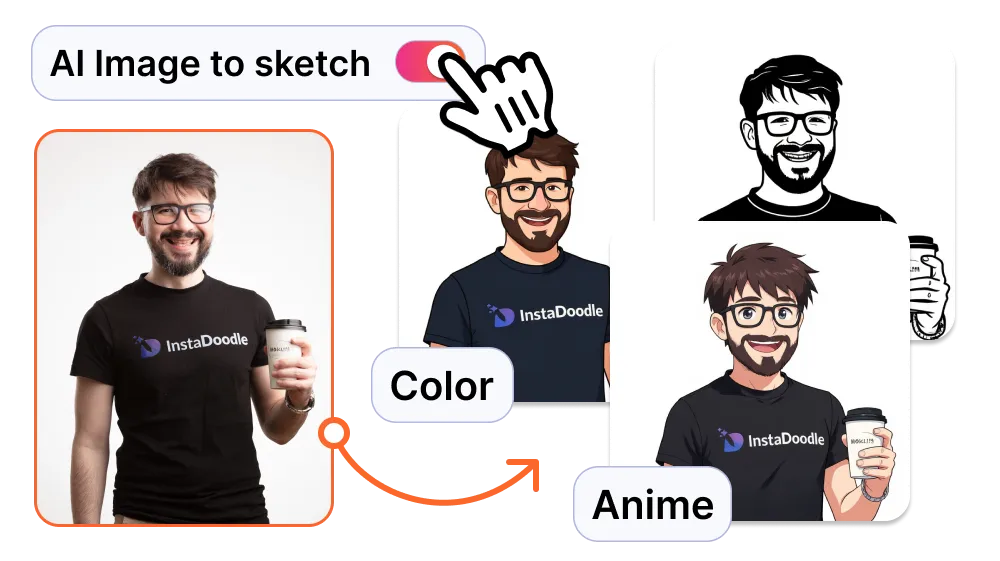
A finished video is a sequence of scenes. You can reorder them, set the length of each and connect neighbours with slide transitions. Picture-to-doodle is the other entry point: upload a photo whose rights you hold, and the tool converts it into a line sketch in colour, anime or black-and-white. That helps when a product shot needs to appear inside an explainer.
Animation, drawing hands and sound
Each element arrives with a motion style. The seller names Draw, Wipe, Slide, Fade and Pop In, and it counts six animation types on Standard. Draw is the signature effect, where a hand seems to sketch the artwork while the narration plays. Standard also offers eight hands, including a realistic one and a doodle one, so the look can match the topic.
Narration can be generated inside the editor or recorded and uploaded by you. Music occupies a separate track, which means you can rewrite a line without redoing the soundtrack. Six AI voices spanning more than 30 languages are listed on Agency, so that is the tier to check if you need generated narration in several languages.
Element libraries, templates and the editor
The seller counts 1,000+ built-in doodle elements and 14+ starter templates on Standard. Pro adds 3,000+ PRO elements and characters, and Agency adds 1,000+ animated elements reached through InMotion. Those counts come from the seller. We did not tally them, so read them as advertised figures rather than checked facts.
The editor includes Free Draw, Fill, an Eraser and a Remove Bg tool, plus an image editor with sliders for blur, opacity and white fill. The toolset leans toward sketching and tidying up. Long live-action edits are not what it is for, and the seller does not suggest otherwise.
Frame shapes and output resolution
Export offers four frame shapes: 16:9 for a widescreen page or deck, 9:16 for vertical short video, 4:5 for a feed post and 1:1 for a square card. Standard renders at 1080p HD, and Pro adds 2K and 4K output for bigger displays.
Changing the frame reshuffles the composition. Revisit every scene after the switch, because a vertical crop often needs captions and figures shifted. Clips that look rushed usually skipped that pass.
The three monthly tiers
There are three monthly tiers: Standard at $47, Pro at $67 and Agency at $127, each charged every month. Standard brings the editor, DoodleAI, picture-to-doodle, the background remover, 150 AI credits and 1080p output. Pro layers on the larger element set, 2K and 4K output, font uploads and the commercial license listed for that tier. Agency contributes AI Wizard, InMotion and AI Voices. The InstaDoodle hub sets all three side by side, and the price page shows the monthly numbers in a single grid.
Building your first project
Start with a short script of three to five scenes. A small run shows you how credits, voice and frame choices interact before you commit to a longer series.
Open the editor and type the opening prompt. Let DoodleAI generate the figures, then drag them to the spots the narration calls for. Add the second and third scenes the same way, giving each one a single idea so the explanation stays easy to follow.
Set the motion for each element, pick a drawing hand, then add narration and a music bed. Play the whole run once with sound on, since timing faults surface in playback far more often than in the editing view.
Last, export at the frame you need. If the same explainer also has to work as a phone clip, switch the frame and walk through every scene again before you download the second file.
Keep a short list of the prompts that worked. Reusing a prompt that already produced a good figure saves credits you would otherwise spend on rounds of guesswork.
Credits and when refunds stop
Every generation draws from your AI credit allowance. Standard holds 150 credits, and a project with lots of AI-drawn figures or a fresh voiceover for each scene burns through them quickly. The seller reserves the right to change what an action costs, so check your balance during the first session. There is also a cutoff to know before you start: a refund stops being available after you have used over half of the credits your tier gives you. Our refund policy guide lays out how to request one.
Uploads, rights and the billing cycle
Anything you type, upload or save passes through the seller’s systems and through outside AI services named in its terms. Bring in only pictures, recordings and footage you are entitled to use. The seller warns that generated material might not win exclusive copyright protection, so look over each video before it goes public. Billing repeats each month until you end the plan through the account controls or support.
Who gets the most from it
Teachers preparing a lesson opener, trainers walking new hires through a procedure and small business owners producing onboarding clips tend to match the tool well. A product explainer that must run on a website, in a vertical feed and inside a slide deck benefits from the range of frames. For a feature-length film or heavy motion graphics, a different category of software is the better pick.
For the steps after checkout, the InstaDoodle login guide covers sign-in, and the where to buy guide shows how to reach the seller’s order page without a reseller in between.
How we rate it
Our editorial score sits at 7.6 out of 10. It is our own editorial rating, not a rating from customers, and it factors in the monthly billing, the credit cutoff and the fact that element counts come from the seller. The comparison page lays the tiers out against one another, and the InstaDoodle hub links the rest of our pages.
Frequently asked questions
What is InstaDoodle used for?
The seller describes it for explainer, training, onboarding, how-to and educational videos drawn in a doodle style.
Does InstaDoodle need to be installed?
No. The seller calls it a cloud web app, so you work in a modern browser on Mac, Windows or another device.
What is DoodleAI?
DoodleAI is the engine the seller names for its text-to-doodle feature. You describe a scene, and it generates characters, elements and backgrounds from the prompt.
Which export sizes does InstaDoodle offer?
The seller lists 16:9, 9:16, 4:5 and square formats. Standard exports in 1080p HD, and Pro adds 2K and 4K output.
Is InstaDoodle a monthly subscription?
Yes. Standard is $47, Pro is $67 and Agency is $127, each charged monthly and described by the seller as recurring until it is ended.
Who owns the videos I make?
The seller says AI output may not qualify for exclusive copyright protection, so review what you make before you publish it. Commercial rights depend on the plan you buy.
what is InstaDoodle · InstaDoodle how it works · InstaDoodle DoodleAI · InstaDoodle features · doodle video maker · whiteboard animation tool · InstaDoodle export sizes